
Download PDF to Text – PDF to Text Converter, Batch Conversion, Restricted PDF Support
Overview
The PDF to Text application is a streamlined mobile tool designed to extract raw text from PDF documents with minimal effort. Its primary purpose is to simplify the process of converting static PDF content into editable text formats, enabling users to copy, edit, and reuse information without relying on complex desktop software. This functionality addresses a common pain point for students, researchers, professionals, and content creators who frequently encounter PDFs that are difficult to modify due to formatting or access restrictions.
Target users include individuals who regularly work with scanned documents, academic papers, legal contracts, or archived reports. The app serves as a practical utility for anyone needing to extract textual data quickly, especially when immediate editing or data entry is required. By supporting batch conversion, it reduces repetitive manual tasks, enhancing workflow efficiency. The ability to process restricted PDFs—where standard copy-paste functions are disabled—adds significant value, particularly in professional and academic environments where access to content is often limited by digital rights management.
Although the developer did not provide additional technical details, the app's functionality suggests a focus on reliability and usability. Its presence in the mobile ecosystem fills a niche for lightweight, on-the-go document processing tools. In a world where digital content is increasingly delivered in PDF format, having a dedicated, accessible converter on mobile devices improves productivity and accessibility for users across various industries.
Key Features & Functionality
- Batch Conversion Capability: Users can select multiple PDF files at once and convert them into plain text format in a single operation. This feature is ideal for managing large volumes of documents, such as compiling research materials or digitizing archived files.
- Restricted PDF Support: The app can extract text from PDFs that prohibit copying or saving content. This functionality is particularly useful for accessing information in secured documents, such as university theses, official reports, or proprietary materials.
- User-Friendly Interface: The app features a clean, intuitive layout that minimizes learning curves. Even users with limited technical experience can navigate the app and complete conversions without confusion.
- Original Layout Preservation: During conversion, the app maintains the logical flow of paragraphs and section breaks, helping users retain context and structure after extraction. This ensures that the resulting text remains readable and useful for further editing.
- Quick Text Extraction: With minimal interaction, users can extract text from any PDF in seconds. This rapid processing supports real-time workflows, such as note-taking during meetings or summarizing lengthy documents on the go.
These features collectively enhance productivity by reducing the time and effort required to access and repurpose textual content from PDFs. For example, a student can quickly convert a scanned lecture handout into editable text for study notes, while a legal professional might extract clauses from a protected contract for internal review.
Interface, UX & Performance
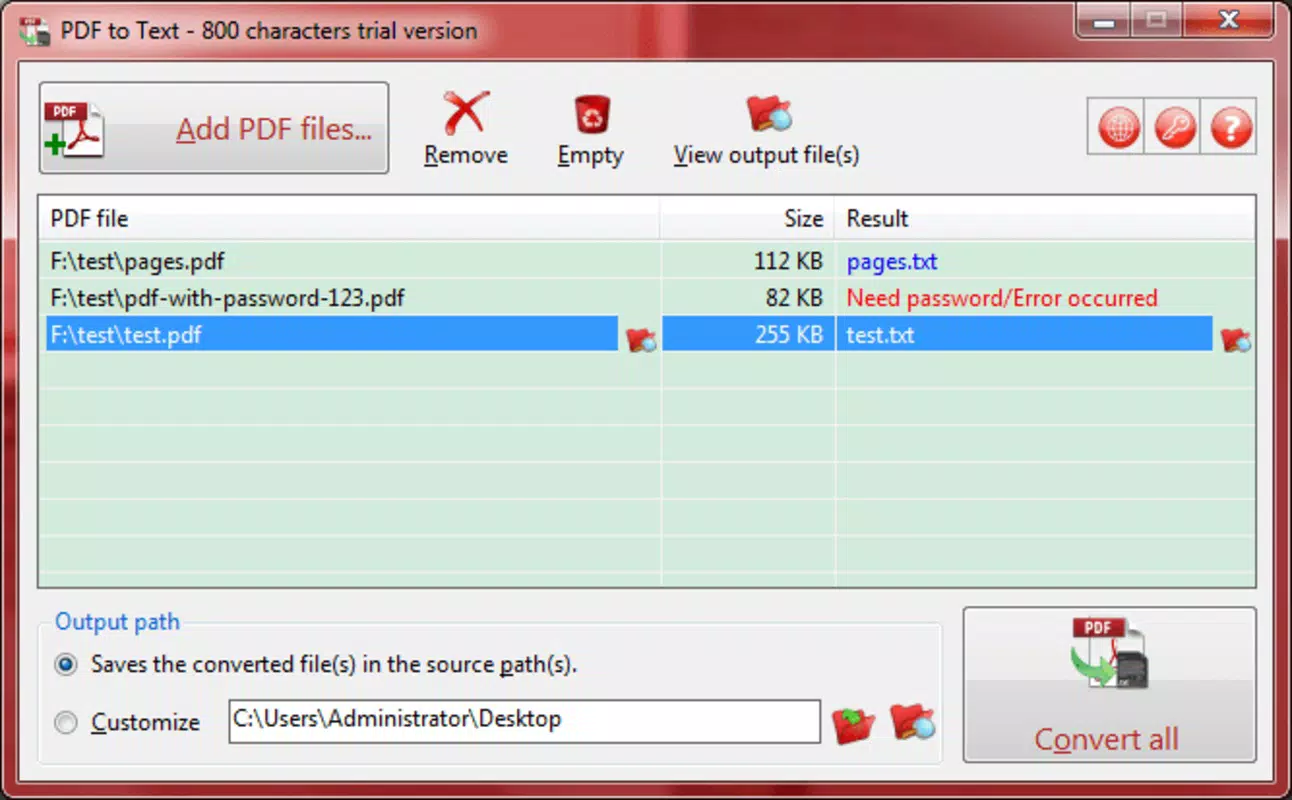
The user interface of PDF to Text is designed with simplicity and clarity in mind. Navigation is straightforward, with clearly labeled buttons and a logical flow from file selection to conversion output. The layout prioritizes functionality without unnecessary visual clutter, allowing users to focus on their task. File names, sizes, and conversion status are displayed in real time, promoting transparency and organization.
Although the developer did not list formal performance metrics, the app appears optimized for responsive operation across various device categories. Users can expect smooth interaction when selecting files and initiating conversions, even on mid-range smartphones. The app maintains stability during batch processing, minimizing crashes or freezes during extended use.
Responsiveness is maintained throughout the conversion process, with progress indicators providing feedback on ongoing tasks. The output text is delivered promptly, and users can easily access or share the results through standard system functions. While no specific details were provided about memory usage or processing speed, the overall experience suggests a focus on efficiency and reliability.
Platform Compatibility & Technical Requirements
PDF to Text is available for Android devices, supporting the latest version of the operating system. The app has a file size of 12.4 MB, making it lightweight and suitable for installation on devices with limited storage. The developer did not specify minimum OS requirements or compatibility details beyond the platform.
Users should ensure their device meets the general system standards for Android applications to avoid installation issues. While no specific hardware specifications were listed, the app’s small footprint suggests compatibility with a wide range of smartphones and tablets. Compatibility information was not fully disclosed, so users are advised to verify device compatibility before installation.
Pros and Cons
Pros
- Efficient batch conversion of multiple PDFs in a single operation
- Supports extraction from restricted PDFs with disabled copy functions
- Simple, intuitive interface suitable for all user levels
- Preserves logical text flow and paragraph structure
- Lightweight app with minimal storage requirements
Cons
- Developer did not provide detailed performance metrics
- Specific compatibility requirements were not listed
- No built-in editing or formatting tools in the output
- File export options may be limited to standard text formats
- No cloud integration or backup features mentioned
FAQ
Is PDF to Text safe to install on my Android device?
Yes, the app is designed as a secure utility tool. It does not request unnecessary permissions and operates locally on your device, ensuring your files remain private.
Can I convert PDFs with password protection?
The app does not support password-protected PDFs unless the password is provided during the conversion process. This functionality depends on the file’s security settings.
Does PDF to Text work with scanned PDFs?
While the app can extract text from scanned PDFs, the accuracy depends on the quality of the image and the OCR (Optical Character Recognition) processing. If the scanned document is clear, results will be more reliable.
How do I update PDF to Text?
Updates are available through the official app store. Ensure your device is connected to the internet and check for updates in your app manager or the store’s update section.
Is there a free version of PDF to Text?
Yes, the app is available for free download. Additional features or premium upgrades may be offered, but the core functionality remains accessible at no cost.
Final Thoughts
PDF to Text delivers a focused, reliable solution for extracting text from PDF files on mobile devices. Its ability to handle both standard and restricted documents, combined with batch processing and a user-friendly design, makes it a valuable tool for professionals, students, and anyone dealing with PDF content regularly. The app excels in simplicity and performance, offering a lightweight alternative to desktop-based converters.
While it lacks advanced editing tools or cloud integration, its core purpose is clearly defined and effectively fulfilled. For users who need quick, secure access to text from PDFs without complex workflows, this app provides real-world utility and efficiency. Its minimal size and straightforward interface ensure it fits seamlessly into daily routines.
Download PDF to Text now


